Ini saya...

My photo
love art and design.fun and creative.full of ideas and always bloated!ehhehehe Designer.photographer.teacher... Art teacher :P

Followers

Tabung duit beli ipone4S

chenta!

Daisypath - Personal pictureDaisypath Anniversary tickers

~My Qhalif~

Lilypie - Personal pictureLilypie First Birthday tickers

Q love mommy's super milk!

Lilypie - Personal pictureLilypie Breastfeeding tickers

Duit tabung beli ipad2

Showing posts with label Apple mac. Show all posts

Thursday, May 5, 2011

Apple of my life


few weeks..a month? sigh......
i miss my MAC so much! all inside ...
huarghhhhhh
but today i can smile jumping happily
i can google..do design + editing
+ everything yehaaaaaa
coz all the master key is inside ehhehehe...

thanks to my MAC doc...my sifuuu far far from the froggyland, niort,france
he talked to me and remind me what i had to do!
HAYYO!!!! forgot!

Now dancing!

yeeeebaaaaaa!

ipod : silent mode! ahhahahha

Monday, March 14, 2011

Connecting Blackberry device to your MAC

Now already 3am
i can't sleep too much things in my head.
ni la masalahnya bila banyak sangat fikir...
tak boleh la tidur...huhuhu

(terdetik dalam hati) hmmm kenapa tak try connect my gorgeous BLACKBERRY to my lovely MAC!
huhu

ok nak tau macam mana???
ini hanya untuk sesiapa yang menggunakan MAC & menggunakan MAXIS


what you need?

1) BLACKBERRY (Mine BOLD 9700/bold2)
2) A gorgeous MAC (laptop or desktop)
3) BLACKBERRY cable (USB)

what you need to do?
1) Connect your BLACKBERRY to your mac...using the cable (USB)
2) go to SYSTEM PREFERENCES
3) go to NETWORK
4) you will see your blackberry device on the left top before airport,bluetooth,ethernet...etc...click your BLACKBERRY

then..go to CONFIGURATION
configuration >Default
1) Telephone number > *99#
2) Account Name > maxis
3) password > wap


then click ADVANCE
1)Vendor > research in motion
2)Model > Blackberry IP modem (CDMA)
3)APN >unet
4)CID> 1
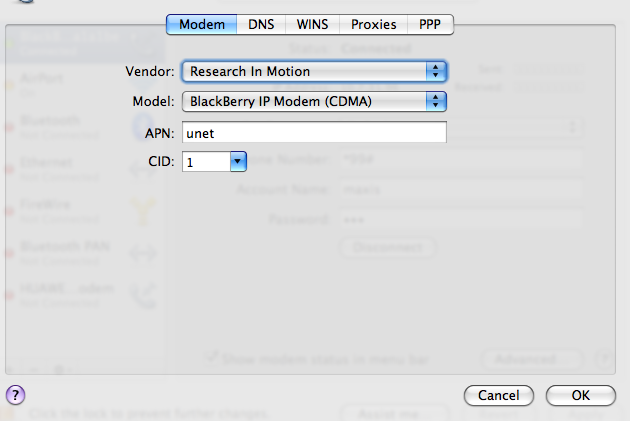
then go to PPP
1) go to setting ,click CONFIGURATION
2) click send PPP echo packets
3) make sure terminal script > NONE
4) click use tcp header compression
5) OK


then click APPLY and CONNECT!

tralalallalalalalallalalal here we go! you connected!
and this is what make me stay awake till now ahhahaha

boleh nyanyi-nyanyi...Senangnya dalam hati...jengjengjeng
(padahal dah lama gila ada blackberry...only now???who cares?)

hope this will help you guys!
happy surfing!

ipod burst : holiday(ye ke ni tajuk dia? -YUNA)

Saturday, December 4, 2010

Can this be real...

Apple MAC always Keep my spirit high and rolling!!!
i gave my old apple lappy to nina my 3rd sister...i've been using my mambo jumbo for 6 years it's 13inch lappy awesome! after my graphite imac 8 years ago....

now i'm craving for this mac book pro..15inch..13 inch will do, no problem.since i got another giant for my daily use now...it just i can't bring it along with me all the time.The performance...damn awesome! it's my imac (i called my imac 24" lappy) coz i always carried my imac here and there especially when i'm going back to my hometown(i can't live without the internet connection!)sorry heheheh...

BUT...

This is my another temptation and i have to pay for almost RM 8K for this(15")...so???
in your dream alia...
come baby come to me!
anyone? you wish!
ehhehehheh


ok..i'm an Apple user and i'm a gadget freak!

another list..

* iphone 4
* ipod touch
* PSP
* Altec lansing for my iphone/ipod
* mac book air (what a crazy mind alia)!
* Canon camera 7d
* Deuter bag

more and more to go...
yaw!